Example: smart home and household
A household runs its devices, scenes, automations, chores, maintenance calendar, plans, and shopping list in one place. A hub agent reports and carries out device changes, a caretaker agent's schedules put recurring work on the calendar, kids may lock doors but not unlock them, and a guest's access ends with the stay.
This page walks through one complete scenario: the model, the actions, the schedules, and every request in order, including the ones that are refused. Everything here uses the public API, so you can load the same model into your own organization and replay it. The model needed two features added for it: scheduled actions and memberships that end.
Who takes part
| Identity | Connects with | Team | |
|---|---|---|---|
| Alex and Sam | the adults, in your app; Sam also through an assistant | REST, with session tokens; MCP, with an OAuth grant of ontology:read actions:apply | adults |
| Kim | a kid, in your app | REST, with a session token | kids |
| Gus | a guest, for a few days | REST, with a session token | guests, until the stay ends |
| hub | the home hub, as an agent account | REST, with its API token | integrations |
| caretaker | an agent account that only runs schedules | the schedules | caretaker |
The hub in the example is a stand-in: it reads what the household asked for and reports back, and controls nothing real. A real hub would do the same over its own device protocols.
adults holds edit_objects, for scenes, automations, plans, and
maintenance tasks. Devices change only through actions, for everyone,
adults included.
The model
| Object type | Holds | Seen by |
|---|---|---|
room | name (unique), floor | everyone in the household, the hub, the caretaker |
device | name, kind (light, plug, lock, thermostat, sensor), the hub’s external_id (unique); the reported online, on, locked, temperature, battery; the requested desired_on, desired_locked, desired_temperature, and pending until the hub applied them; guest_access, last_seen | adults, kids, guests, the hub |
scene | name, settings (a list of device settings, checked by a validator), pending, requested_by, applied_at | adults, kids, the hub |
automation | name, trigger_event, trigger_device, from_hour, until_hour, enabled | adults, the hub |
device_event | event_id (unique), kind, at, device_external_id | adults, the hub |
maintenance_task | title, due_at, status, done_by, done_at, notes | adults, the caretaker |
chore | title, assignee, due_at, points, status, approved_by | adults, kids, the caretaker |
plan | title, status, target_date, budget, notes | adults, kids |
shopping_item | name, quantity, added_by, bought, bought_by | adults, kids, guests |
Every type is restricted to the teams in its last column. Links put devices and maintenance tasks in rooms, events under their device, a scene under each automation, and tasks under plans.
A scene’s settings are checked by a custom
validator, so a scene cannot set a device twice
or set it to nothing:
def validate(value):
    seen = []
    for setting in value:
        device = setting['device']
        if device in seen:
            return 'device ' + device + ' is set twice'
        seen.append(device)
        if setting.get('on') is None and setting.get('locked') is None and setting.get('target_temperature') is None:
            return 'the setting for ' + device + ' changes nothing'
    return True
The actions
| Action | Granted to | Does |
|---|---|---|
switch_device | adults, kids, guests | asks for a light or plug on or off |
set_temperature | adults | asks for a thermostat target, 10 to 28 °C |
lock_door | adults, kids, guests | asks for a lock to lock |
unlock_door | adults | asks for a lock to unlock |
guest_unlock | guests | the same, for locks with guest_access only |
activate_scene | adults, kids | asks the hub to apply a scene |
report_state, report_event | the hub | what a device does now, and what it sent; a pending change is done |
run_automation | the hub | asks to run an automation for an event; the server checks the rule |
scene_applied | the hub | marks a requested scene done |
schedule_task, complete_task | adults; the caretaker schedules tasks | the maintenance calendar |
assign_chore, complete_chore, approve_chore | adults and the caretaker assign; adults and kids complete their own; adults approve | chores |
add_shopping_item, buy_item | everyone adds; adults buy, once | the shopping list |
host_guest | adults | puts a visitor on guests until a time |
The household’s actions only record what is wanted: switch_device sets
desired_on and pending. The hub reads pending devices, carries the change
out, and reports the device’s state with report_state, which clears
pending. So the objects always say both what was asked and what the device
actually does.
Who may open which door
Locking is granted to everyone at home, unlocking only to adults. Guests get their own action, whose criterion limits it to doors marked for guests:
{ "name": "guest_door", "message": "this door is not open to guests",
  "condition": { "op": "eq", "left": { "object": "device", "property": "guest_access" },
                 "right": { "value": true } } }
Hosting a guest
Adults host guests through an action rather than by managing the guests
team: host_guest takes the team, the guest, and the end of the stay, and
adds the membership with an expiry. Its criteria check teams and kinds:
"criteria": [
  { "name": "guests_team", "message": "guests stay on the guests team",
    "condition": { "op": "eq", "left": { "param": "stay" }, "right": { "team": "guests" } } },
  { "name": "a_visitor", "message": "the household are not guests",
    "condition": { "op": "not", "condition": { "op": "or", "conditions": [
      { "op": "contains", "list": { "user": { "param": "guest" }, "field": "teams" }, "value": { "team": "adults" } },
      { "op": "contains", "list": { "user": { "param": "guest" }, "field": "teams" }, "value": { "team": "kids" } } ] } } },
  { "name": "a_person", "message": "guests are people",
    "condition": { "op": "eq", "left": { "user": { "param": "guest" }, "field": "kind" }, "right": { "value": "human" } } }
],
"edits": [
  { "op": "add_member", "team": { "param": "stay" }, "user": { "param": "guest" },
    "expires_at": { "param": "until" } }
]
The action’s grant stands in for edit access to the team, so adults host
guests without being able to change guests, or any other team, directly.
Automations checked by the server
An automation is data: “when the hall motion sensor reports motion between
20:00 and 6:00, run the Night path scene”. The hub watches events and asks to
run it with run_automation, passing the automation, the scene, and the
event. The server decides whether the rule holds: the automation is enabled,
the event is its trigger, the scene is its scene (linked), and the time is
within its hours:
def check(ctx):
    a = ctx['objects']['automation']['properties']
    hour = int(ctx['objects']['event']['properties']['at'][11:13])
    start = a['from_hour']
    end = a['until_hour']
    if start < end:
        inside = start <= hour and hour < end
    else:
        inside = hour >= start or hour < end
    if not inside:
        return 'the automation runs from ' + str(start) + ':00 to ' + str(end) + ':00 (UTC), not at ' + str(hour) + ':00'
    return True
The caretaker’s schedules
Two schedules run as the caretaker
agent, each passing the occurrence’s time as due_at:
[
  { "api_name": "smoke_alarms", "description": "Test the smoke alarms every month",
    "action": "schedule_task", "run_as": "<caretaker>",
    "params": { "room": "<hall>", "title": "Test the smoke alarms" },
    "occurrence_param": "due_at", "every": 1, "unit": "month", "starts_at": "<now>" },
  { "api_name": "bins", "description": "Kim takes out the bins every week",
    "action": "assign_chore", "run_as": "<caretaker>",
    "params": { "title": "Take out the bins", "assignee": "<kim>", "points": 5 },
    "occurrence_param": "due_at", "every": 1, "unit": "week", "starts_at": "<now>" }
]
The caretaker holds no write permission, only the grants of those two actions, so the schedules can create tasks and chores and nothing else.
Setting it up
As an owner, through the REST API:
- Create the
scene_settingsvalidator, the five teams (adultswithedit_objectsandview_members), and the hub and caretaker agents, and add the people and agents to their teams. Gus is not inguestsyet. - Create the object types and link types, and restrict each type as above.
- Create the action types and grant them, and create the two schedules.
- Create the rooms, the devices, the Night and Night path scenes, the automation, a plan to repaint the kids’ room, and milk on the shopping list.
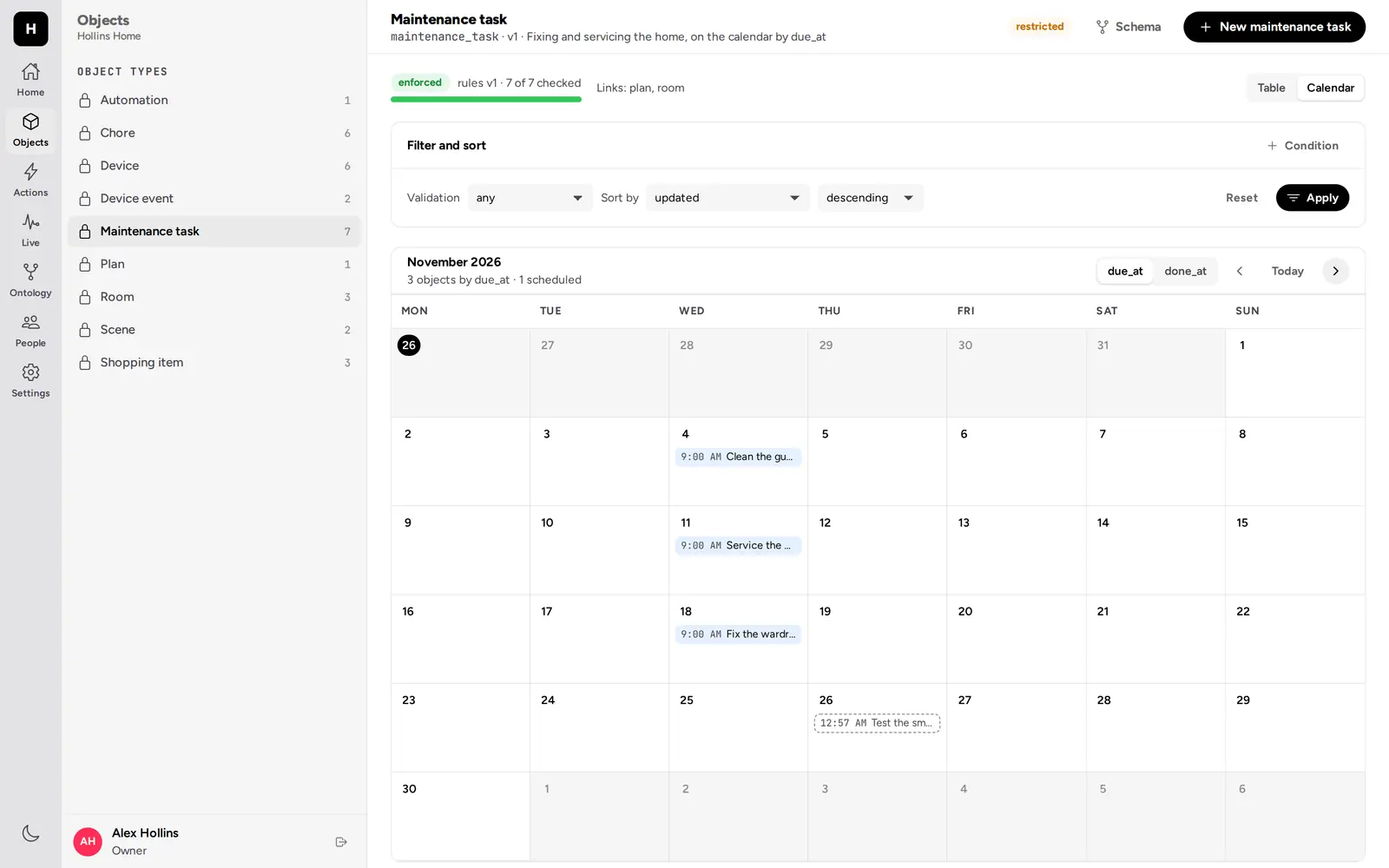
1. The calendar fills itself
The maintenance job runs the schedules’ first occurrences: a task “Test the
smoke alarms”, due now, created by the caretaker, and Kim’s “Take out the
bins” chore. The calendar is a range query on due_at:
POST /v1/ontology/objects/chore/query
{ "filter": { "op": "and", "filters": [
    { "op": "gte", "property": "due_at", "value": "<yesterday>" },
    { "op": "lt", "property": "due_at", "value": "<in a week>" } ] },
  "order_by": { "property": "due_at", "direction": "asc" } }
Sam’s query of maintenance tasks finds the smoke alarm check; Kim’s of chores
finds the bins. Both schedules show runs: 1, failures: 0. Kim cannot see
maintenance tasks at all (404), and the caretaker cannot edit the chore it
created (403).
2. The hub reports, and carries out changes
The hub reports every device with report_state, with an idempotency key per
report. A report it resends after a timeout is a replay. The front door
reports locked.
Sam turns the living room lamp on (switch_device): the lamp is pending.
The hub sees it, switches the lamp, and reports it on; pending is cleared.
Switching the front door is refused at criteria.kind: it is not a light or
a plug.
Conflict. Alex and Sam both read the thermostat at the same version and
set it, Alex to 21 °C and Sam to 19.5 °C. Alex’s commits; Sam’s is
409 version_conflict. Sam reads it again, sees 21, and sets 20. The hub
applies 20.
3. Kim
Denied. Kim tries to unlock the front door and to turn the heating up:
403 both times. Neither action is granted to kids.
Kim locks the front door and switches the hall light on, both granted; the hub carries them out.
Sam trying to complete Kim’s chore is refused at criteria.assignee. Kim
completes it, but may not approve it (403); Sam approves it.
4. Gus stays for three days
Before the stay, Gus cannot see the garden gate (404). Alex hosts Gus until
a time three days ahead:
POST /v1/actions/host_guest/apply
{ "params": { "stay": "<guests>", "guest": "<gus>", "until": "<in three days>" } }

201  "memberships": [{ "op": "add", "team": "<guests>", "user": "<gus>",
                       "expires_at": "<in three days>", "changed": true }]
The action refuses the wrong guest or team: Kim, who is in kids, at
criteria.a_visitor; the adults team as the stay, at
criteria.guests_team; the hub, an agent, at criteria.a_person. Kim
applying it is 403: it is granted to adults only. The guests team’s history
records the change as made by Alex, and subscribers see a
team.member_added event.
The guests team lists Gus with that membership_expires_at. Gus opens the
garden gate (guest_unlock). The front door is refused at
criteria.guest_door, and unlock_door is 403. Gus adds oat milk to the
shopping list.
5. Scenes and automations
Alex activates the Night scene. The hub applies its settings, lamp off, front door locked, thermostat at 18 °C, and marks it applied.
Motion in the hall at 22:00: the hub reports the event (report_event; a
resend replays, and the same event_id under another key is refused, since
it is unique) and runs the automation. With the Night scene it is refused at
criteria.scene, not the automation’s scene; with Night path it applies, and
the hub turns the hall light on. The same motion at noon is refused at
criteria.hours.
A scene whose only setting changes nothing is refused by the validator. Kim
cannot see the event log (404).
6. The stay ends
Once expires_at has passed, nothing has to run. On Gus’s next request the
membership counts for nothing: guest_unlock is 403, the garden gate is
404, and so is the shopping list. The guests team lists no one.
7. Plans and the week ahead
Sam completes the smoke alarm check (“All four beep”), schedules a “Buy
paint” task for the kids’ room in five days, and links it to the repainting
plan. Kim, who sees plans but may not edit them, is refused the same link
(403), and cannot see the plan’s tasks (404).
Sam’s MCP assistant reads the week’s maintenance tasks, the smoke alarm
check and buying paint, adds paint rollers to the list, tries to set the
thermostat to 35 °C (refused at params.target, above 28), and buys the
milk. Alex, buying the milk again, is refused at criteria.not_bought. Oat
milk and paint rollers are left on the list.
What everyone saw
The audit log tells the callers apart: assign_chore was applied by the
caretaker with method and via schedule, buy_item through Sam’s
assistant (oauth, mcp), and every event report by the hub with its API
token over REST.
What this shows
- Recurring work runs on its own, safely. The schedules apply once per occurrence as an agent that may do exactly those two things.
- Access can end on time. A guest’s access needs no one to remember to remove it, and ends everywhere at once: actions, objects, and the list.
- What was asked and what happened are both kept. Devices hold the household’s request and the hub’s report, and a race on the thermostat is a conflict, not a silent overwrite.
- Rules stay in the server. Who may unlock, which doors guests may open, and when an automation may run are checked by the server, whatever the hub or an app does.
What it does not do yet
- A scene cannot change its devices itself. Actions edit only their parameters’ objects, so the hub reads a scene’s settings and reports each device.
- Nothing runs an action when an event arrives. Automations are data the hub acts on, with the server checking the rule.
- Absent optional parameters are written as removals by declarative edits, so the hub reports a device’s whole state each time.
- Times are UTC. Automation hours and schedules have no time zone per organization.
- Inbound events need an API token. There is no signed inbound webhook endpoint for a device platform to call.
- The calendar is one query per type. A schedule’s future occurrences are not objects until they run; the web app draws them from the schedule, but a query does not return them.
- An ended membership leaves the guest a member of the organization, in
everyone; it does not deactivate them.