Secrets
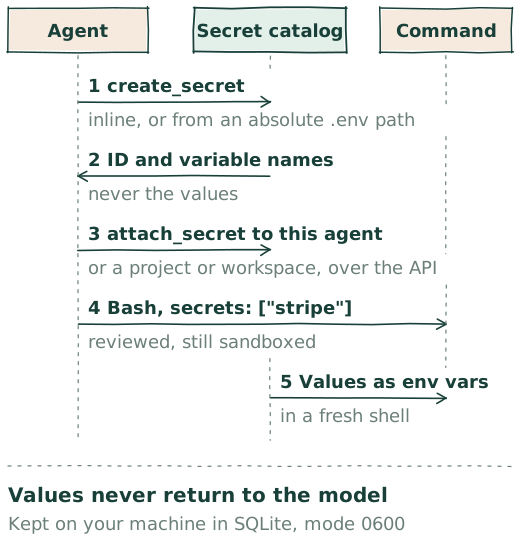
An API key reaches a command only when the agent names its bundle. The model works with IDs and variable names; the value travels from a catalog on your machine into the command's environment, and nowhere else. One path for Claude, Codex, and Grok.
One catalog per installation
Secrets live in one catalog on the machine that runs Happy Agent, shared by every agent of that installation. A secret bundles one or more environment variables under a short ID, with a description and a version that changes on every write. Two IDs, github and project-git, are reserved for secrets Happy manages itself; the API lists them but does not update them.
Creating and updating
- Ask the agent.
create_secrettakes the value inline in the tool call, or as an absolute path to a.envfile on the host. Both are reviewed in Auto. An inline value stays in the transcript. A.envpath keeps it out, because the daemon reads the file itself; that read is the one step that runs with host filesystem access. The file must be a regular file of at most 1 MiB, and an error never quotes its contents. - In the app. Settings → Happy Agent → Secrets → New secret: a description, variable names with their values in password fields, and a switch for whether agents may be granted it. The command palette finds it under Secrets.
- Over the API.
POST /v0/secrets, andPATCH /v0/secrets/:idwith the current version inIf-Match. A client's request is not Auto-reviewed; review is for what the agent does.
update_secret replaces the whole bundle, so a variable left out is gone; over the API, null removes one. Creating or updating never attaches.
What the model sees
list_secrets and reference_secret return the ID, description, sorted variable names, availability, and version. No tool result, event, or API response carries a value: the client's schema for a secret record rejects value fields outright, and the methods that resolve values are not tools. Happy Desktop lists the same metadata and nothing more.
Attaching
A grant makes a secret usable by an agent: to the agent itself, to its workspace, or to its project, which covers the root and every workspace under it. Grants are immutable; detach and attach again to change one. attach_secret and detach_secret act only on the calling agent, never its subagents, and are always reviewed in Auto. A client grants through PUT /v0/secrets/:id/attachments/project/:projectId, or the workspace and agent equivalents. A secret can be marked unavailable to agents, which refuses new grants, and cannot be marked so while any grant exists.
One command at a time
Every shell tool takes a secrets argument: Bash for Claude, exec_command for Codex, run_terminal_command for Grok. It lists the IDs this one command needs, or none. Happy resolves them against the agent's own, workspace, and project grants and spawns a fresh host shell for the command. Before the spawn it strips every variable name belonging to any attached bundle from the ambient environment, case-insensitively, then adds only the selected values; afterwards it clears its copy. Typing into a background command that carries secrets is reviewed too. Commands on a runner or in a Docker container cannot select secrets yet: the values stay on the daemon's machine, so only a command there can receive them.
The sandbox and Auto review
Selecting a secret never changes the sandbox. In Auto, a command that names any bundle is reviewed, and the review sees which bundles, not their values; the command still runs inside Workspace write. Leaving the sandbox is a separate request on the same call, so an agent can ask for secrets, for Full access, or both. The keychain and other system credential stores are unreachable from the sandbox; the secrets argument is the only way a value reaches a command. The rest of the model is on Permissions & Sandbox.
At rest
The catalog is a table in Happy Agent's SQLite database under ~/.happy/agent, stored as plaintext JSON. The file is mode 0600 and its directory 0700: access control, not encryption, so a replaced value may persist in SQLite pages and the write-ahead log. A value given inline to create_secret also remains in that session's transcript; the app's dialog and the .env path leave nothing there.
In Happy Desktop
Settings → Happy Agent → Secrets lists every saved secret: its description, when it was updated, the badges Managed, All agents, and Scoped, and its variable names. New secret opens the dialog above. Attaching, updating, and detaching go through the agent or the API.
In team mode
A team server is one Happy Agent with one catalog, and no secret action is reserved for the owner. Over the API, any signed-in member can:
- list every secret's metadata;
- create a secret, and replace or remove the values of any secret except those Happy manages;
- attach any secret available to agents to any agent, workspace, or project, and detach any grant.
Those requests carry the member's WorkOS token and, like any client's, are not Auto-reviewed. Inside a session, any member's agent can select the secrets granted to it, its workspace, or its project for a command, under the same review as on a personal machine. Values stay on the server, where the commands run; no member's app or machine receives them. Put on a team server only the secrets every member may use.
Compared with Hermes Agent and OpenClaw
Three designs for the same problem, from each project's own documentation.
| Happy | Hermes Agent | OpenClaw | |
|---|---|---|---|
| Where values live | SQLite on the agent's machine: plaintext JSON, file 0600, directory 0700 | ~/.hermes/.env, plus Bitwarden, 1Password, or a command helper synced at startup | Where a SecretRef points: env, file, exec, or the store in the state SQLite, unencrypted, 0600 and 0700 |
| How a value gets in | A reviewed tool call, the Desktop dialog, or the API | hermes config set or .env; managers load on start | Control UI, CLI, or dotenv import; the secrets tool asks a person, in a masked prompt |
| What a command receives | Only the bundles it names, in a fresh shell, on the daemon's machine | A sanitized environment; only terminal.env_passthrough names | secret kind: not injected by default; env kind: plaintext; with the egress proxy, a sentinel swapped only toward allowed hosts |
| Scope | Agent, workspace, or project; chosen per command | The agent process | Gateway-wide, team-scoped; allowed hosts for egress |
Hermes Agent by Nous Research keeps API keys in ~/.hermes/.env and non-secret settings in config.yaml, with command-line flags above the config and the config above .env; logs are redacted automatically. At startup it can pull more from Bitwarden Secrets Manager through bws, from 1Password through op:// references, or from a shell command that prints KEY=VALUE lines, in a precedence ladder across sources, with an optional AES-GCM encrypted cache for Bitwarden. Terminal commands, code execution, and cron scripts run with the managed credentials stripped from their environment; a skill's required_environment_variables or the terminal.env_passthrough list lets named ones through (Hermes docs).
OpenClaw replaces a plaintext credential in its config with a SecretRef of source env, file, exec, or store, one credential at a time; plaintext keeps working. The store holds two kinds: secret, write-only with no reveal call, and env, readable by agents. Model-provider credentials stay in the Gateway process as sentinels until the egress proxy substitutes them, which its documentation describes as not a process-isolation boundary (runtime model). The secrets tool lets the agent request a credential by name, reason, and hosts; a person supplies it, chat channels get a link rather than the value, and there is deliberately no action that writes a value the agent supplies (tool). The CLI refuses --value for the secret kind and soft-deletes for 30 days; an audit, configure, apply workflow migrates existing config, with exec recipes for 1Password, Bitwarden, Vault, pass, and sops.