Team Sign-In with WorkOS
A Happy Agent team server is powered by WorkOS. WorkOS signs each member in and keeps the team's membership; the server only checks a signed token on each request. It never sees a password. Prefer your own identity provider? Use it instead.
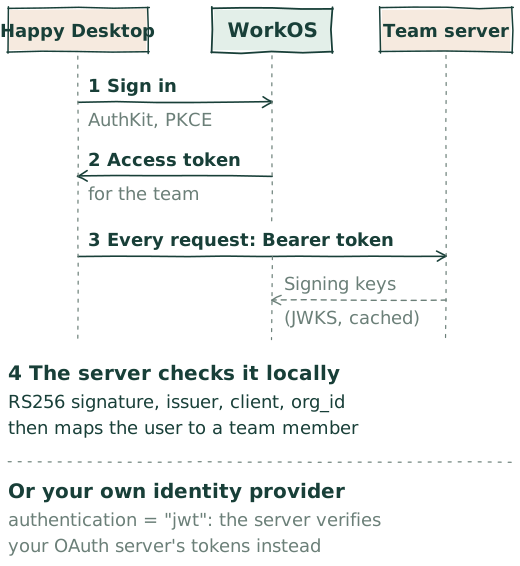
What WorkOS does
- Accounts and sign-in: AuthKit. Your Happy Social account is a WorkOS user. Desktop signs it in with AuthKit in your browser, using the public-client PKCE flow, so the app ships no client secret. The rotating refresh token stays on your machine.
- Teams: Organizations. A Happy team is a WorkOS organization with the server's address registered on it. Creating the team makes you its admin.
- Invitations. Members join by email. WorkOS sends the invitation and handles accepting it; an invitation grants ordinary membership.
- A token per team. For each team you connect to, the Happy Agent in your Desktop trades its refresh token for an access token scoped to that organization, WorkOS's organization switching, and sends it with every request.
What the server checks
A team server accepts nothing but a bearer token on every request, health included. Only GET /v0/authentication, which tells the app how to sign in, is public. For each token it checks, locally:
- the RS256 signature, against the signing keys WorkOS publishes for Happy's client, fetched once and cached;
- the issuer and
client_id, and thatexp,iat,sub,sid, andorg_idare present; - that
org_idis this team's organization.
Anything else gets a 401. The WorkOS user in sub becomes a team member when they first save their profile; the user named as the owner gets the owner's privileges. Past fetching the public keys, the server makes no call to WorkOS to accept a request.
[feature.team]
enabled = true
workos_client_id = "client_01KZD3XE9YAFAMT0P8TD4HP73E"
workos_organization_id = "org_..."
owner_workos_user_id = "user_..."
Why WorkOS
It is the part of a team product nobody wants to build twice: accounts, organizations, invitations, and sessions. With WorkOS handling them, Happy runs no password database and no invitation mailer of its own, and a server you host yourself can trust a team sign-in by checking a signature. Thank you, WorkOS.
Bring your own identity provider
Set authentication = "jwt" and members sign in with your organization's own OAuth 2.0 server instead, such as Okta, Entra ID, Google Workspace, or Keycloak. The app runs the authorization code flow with PKCE against that server directly. The team server only verifies the JWT access tokens it is sent; it never receives the sign-in code or a refresh token. Sign-in then involves no WorkOS account. Set up enterprise JWT sign-in walks through it.
Set it up
Ask the Chief of Staff, "Create a team called Acme on my server". It follows the public recipe, Create and deploy a Happy team: your account, the name and endpoint, the team, team mode, a verified connection, then invitations.
Sources in Happy Agent: the token check, AuthKit sign-in and teams, Happy teams, and team mode settings.