No Open Ports: How Happy Reaches Your Server
Happy Desktop reaches a remote Happy Agent through Tailcat, Tailscale's open source data plane without its control plane. The server opens no port and needs no public IP, and nobody needs a Tailscale account. Traffic is WireGuard-encrypted from your machine to the server, and the server still checks a credential on every request inside.
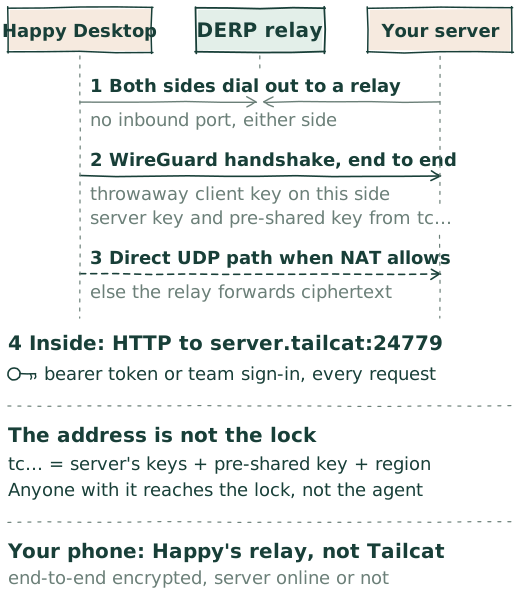
What Tailcat is
"Tailscale without Tailscale, by Tailscale." Tailcat takes the pieces of Tailscale that move packets, WireGuard tunnels, NAT traversal, and the DERP relays, and leaves out the coordination server. One side runs a Tailcat server and gets a short tc… address; the other side connects to that address. The two meet at a relay, try to punch through NAT to a direct UDP path, and keep using the relay if that fails. It runs in userspace, without root and without touching routing tables or DNS. Tailscale runs free, rate-limited relays for it; the default DERP map lists them, and you can run your own.
What Happy Agent adds
- One build, one version. Every Happy Agent release binary embeds Tailcat v0.7.0. A source checkout or the npm package runs
tailcatfrom your PATH instead. - A stable identity. The first time Tailcat is enabled, Happy Agent runs
tailcat genkeyand keeps the private key in~/.happy/agent/tailcat/default.private.json, in a directory only its user can open. The address stays the same across restarts and disable/enable cycles. Do not copy or share that file. - A fixed port.
tailcat serveforwards one loopback port, 24779 by default, to the Happy Agent API: the owner-only Unix socket in standalone mode, the HTTP listener in team mode. Happy Agent binds that exact port and never substitutes another, so the address and port can be stored together. - Supervised. Tailcat starts after the API has bound and is restarted with the same identity if it exits. While it is open,
~/.happy/agent/tailcat/addressandporthold the live values. - Admin only, reviewed. Only an active admin bot, the Chief of Staff by default, can turn Tailcat on or off or read its status. Changing it is an internet-exposure action, and in Auto mode Happy reviews the exact operation before the tool runs.
When the Chief of Staff deploys a server, it asks you before turning this on. By hand, in the machine-wide happy.toml:
[feature.tailcat]
enabled = true
port = 24779
A team registers tailcat://ADDRESS:PORT with Happy Cloud when it is created, and every member's Desktop finds the server through that.
Every connection
- A throwaway client key. The Happy Agent inside your Desktop starts
tailcat --key=new sockswith the server's address: a fresh WireGuard key for this carrier process, and a SOCKS5 listener on 127.0.0.1. - Meet at the relay. Both machines dial out to the relay region named in the address. Neither accepts an inbound connection. Through the relay they exchange path-discovery messages and, when NAT allows, move to a direct UDP path. When it does not, the relay keeps forwarding.
- WireGuard, end to end. The handshake uses the server's key from the address, the pre-shared key from the address, and the throwaway client key. Everything after it is ciphertext between the two machines. A relay forwards already-encrypted packets and cannot decrypt them; it sees IP addresses, timing, sizes, and the public keys it routes by.
- HTTP inside. Happy Agent connects through the SOCKS listener to
server.tailcatat the fixed port and speaks its ordinary HTTP API inside the tunnel. The API token travels inside the tunnel and is never handed to the Tailcat process.
The address is not the lock
A tc… address encodes the server's public keys, its relay region, and, since Tailcat v0.6.0, a WireGuard pre-shared key. Happy keeps the pre-shared key on, so the address is a secret as well as a locator: a relay sees the server's public key go by, but without the pre-shared key it cannot open a tunnel. Treat the address as private.
The address alone still gets nobody in. Happy does not use Tailcat's client allowlist, so anyone who holds the address reaches Happy Agent's authentication boundary, and no further. Every request inside, health checks included, needs the server's bearer token in standalone mode or a team sign-in in team mode. A tunnel that opens and then answers 401 means the transport works and the credential does not.
An identity created by an older Happy Agent, which bundled Tailcat v0.4.0, has no pre-shared key. The server keeps serving it with a warning, and clients of every version can connect. For that address, anyone who learns the server's public key and region, a relay operator included, can reach the authentication boundary. Replacing the identity key mints a current address; a team then publishes the new endpoint with update_happy_team. The reverse limit: a current address cannot be reached by Tailcat v0.5.0 or earlier.
Your phone is different
Phones do not use Tailcat. The server publishes its sessions to your Happy account through Happy's own relay, end-to-end encrypted, so your phone can read them even while the server is offline.
Why Tailcat
We wanted a server you can reach from a laptop on hotel Wi-Fi without a port forward, a VPN, a public IP, or one more account. Tailcat is exactly that piece, built from the same WireGuard, magicsock, and DERP code Tailscale runs in production, open source, with free relays Tailscale runs. Thank you, Tailscale.
Try it by hand
With Tailcat on another machine and three values carried over from the server, one command checks a standalone server's health through the tunnel:
TAILCAT_ADDRESS="tc..."   # ~/.happy/agent/tailcat/address
TAILCAT_PORT="24779"      # ~/.happy/agent/tailcat/port
HAPPY_TOKEN="..."         # ~/.happy/agent/token

tailcat socks "$TAILCAT_ADDRESS" curl \
  -H "Authorization: Bearer $HAPPY_TOKEN" \
  "http://server.tailcat:$TAILCAT_PORT/v0/health"
Sources in Happy Agent: the Tailcat module, the server side, the client side, Tailcat internet exposure, team mode, and what we learned. In Tailcat: the README, the changelog, and its threat model. Relays: DERP servers.