Talk to Your Agents: Voice with ElevenLabs
In the Happy app on your phone, tap the mic and talk. A voice agent, also called Happy, listens, sends what you ask to the coding agent in the session you are looking at, tells you when it is done, and takes your yes or no on a permission request. It runs on ElevenAgents, ElevenLabs's conversational agent platform. Voice is the one paid thing in Happy: 20 free minutes every 30 days, then a subscription, or your own ElevenLabs agent with no limit from us.
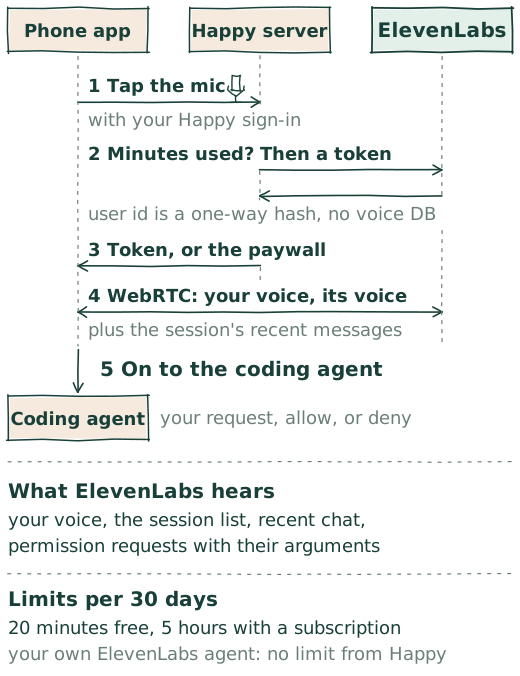
What the voice agent does
- Speaks only when spoken to. It answers to "Happy, …" or a clear follow-up. Anything else, it skips its turn, so you can talk to the person next to you. One sentence at a time.
- A bridge, not a coder. It decides nothing itself. It assumes you are narrating what you will eventually ask the coding agent, and sends the request once you have formulated it.
- Across sessions. It starts with a list of your active sessions, follows the one you focus, and hears updates from the others.
- Reports back. When the coding agent finishes, the voice agent tells you, even if you said nothing.
- Permissions by voice. A tool permission request is read to you. It is allowed or denied only on your word, unless you tell it to accept the ones that follow.
- Your language. Settings → Voice sets the voice agent's language.
How a conversation starts
- The app asks Happy's server for a conversation, with your Happy sign-in and the ID of Happy's ElevenLabs agent.
- The server derives your ElevenLabs user ID, a one-way hash of your Happy user ID under a server secret. Your Happy account is not sent; ElevenLabs sees that
u_…string. - It asks ElevenLabs for your conversations of the last 30 days and adds up their durations. ElevenLabs is the record; Happy keeps no voice database.
- Within the limits, it mints a single-use conversation token from ElevenLabs under that user ID and returns it. Past them, the app shows the paywall instead.
- The app opens a WebRTC session with ElevenLabs on that token. From here Happy's server is out of the loop: audio moves between your phone and ElevenLabs.
Happy's ElevenLabs agent accepts only tokens minted by Happy's server, so the agent ID in the open source app is harmless on its own.
What ElevenLabs hears
Messages between your devices are end-to-end encrypted. Voice sends some of that content to a third party, from your phone, where it is already decrypted:
- your microphone audio, and the agent's replies;
- the
u_…user ID and the system prompt; - the IDs and summaries of your active sessions;
- for the focused session, its project path, summary, and up to 50 messages of history: your messages, the coding agent's text, and the names and descriptions of the tools it used, without their arguments or output;
- new messages as they arrive, and each permission request with the tool's name and arguments;
- a record of each conversation, which is what Happy's server reads to count minutes.
If a session holds something you would not hand to a third party, keep voice closed on it.
Limits
| Tier | Per 30 days |
|---|---|
| Free | 20 minutes |
| Subscribed | 5 hours |
| Your own ElevenLabs agent | No limit from Happy |
| Everyone | 100 conversations |
ElevenLabs costs Happy about a cent a minute. The subscription in the app pays for that and for Happy's open source work. The 100-conversation cap is a limit of the usage query, which reads at most 100 conversations; reaching it blocks voice until the window moves on, and is worth an issue. Settings → Voice shows your minutes and conversations against their limits.
Bring your own agent
Settings → Voice → Bring your own agent takes the ID of an agent in your own ElevenLabs account. The app then connects to ElevenLabs directly with that agent and never calls Happy's server for voice: no minutes counted, no paywall, your ElevenLabs bill. Once an agent ID is set, the app shows a prompt guide for configuring that agent.
GPT-Live on Happy Desktop
Happy Desktop has experimental voice calls of its own, on OpenAI's GPT-Live instead of ElevenLabs. Turn on Settings → General → Enable experimental features, then Settings → Experimental → Voice calls, and pick the account: a Codex subscription, which uses gpt-live-1-codex on your ChatGPT plan, or an OpenAI API key, which uses gpt-live-1 and bills that API account. A phone button appears beside Settings. The call runs from the Happy Agent on your machine with that account, so Happy's minutes and paywall do not apply. It steers the Desktop window rather than a coding agent: it navigates and stages a message, and you press Send. Sources in Happy Desktop and Happy Agent: the setting, the model and endpoints, and what we learned.
Why ElevenLabs
A voice agent that listens continuously, handles interruptions, and speaks back without a pause is a product in itself. ElevenAgents gives us that, with per-conversation tokens so our agent accepts only what Happy's server minted, and conversation records we can count from without a database of our own. Thank you, ElevenLabs.
Sources in Happy: paid voice, the server route, starting a session, the system prompt, the client tools, what is sent as context and its switches, and voice settings. ElevenLabs: ElevenAgents and the React Native SDK.