Happy vs T3 Code
Happy and T3 Code are both free, MIT-licensed apps for running Claude, Codex, and Grok agents on the subscriptions you already pay for, from a desktop app or a phone. Pick T3 Code for more agents in its UI, a web client, and tools for app work. Pick Happy, the T3 Code alternative for teams, for a self-hosted server where everyone signs in as themselves, and one harness that runs Claude, Codex, and Grok under the same sandbox.
Side by side
Facts about T3 Code come from its source and docs, checked on October 27, 2026. It ships often; check there for the current state.
| Happy | T3 Code | |
|---|---|---|
| Agents | Claude, Codex, Grok, more as harnesses | Claude, Codex, Grok, Cursor, OpenCode, Antigravity, more |
| Apps | Desktop, iOS, Android | Desktop, web, iOS, Android |
| Default agent loop | Happy's own | Each vendor's own |
| Sandbox | One OS sandbox | Each provider's own |
| Initial default mode | Auto: sandbox plus review | Full access |
| Model switch keeps | The transcript | Short chats whole, long ones a selection |
| Team server, per-member sign-in | ✓ | ✗ |
| Scripting | REST API | MCP, t3 thread |
Both defaults can be changed in settings. Both run subagents on other providers, steer a running turn, and pick threads back up after a restart.
Where T3 Code is better
- More agents in the UI. Cursor, OpenCode, Google Antigravity, Pi, Muse Code, fx, and agents from the ACP Registry, besides Claude, Codex, and Grok Build, each set up from Settings.
- A web client. app.t3.codes reaches a machine over HTTPS or T3 Connect from any browser.
- Queued messages you can edit. They are saved on the server, and you can edit them, remove them, or send one as a steer.
- Tools for app work. A live iOS Simulator or Android Emulator next to the thread, browser tabs you share with the agent, and pull requests on GitHub, GitLab, Bitbucket, and four more hosts.
- Guest links (beta). Over T3 Connect, let someone follow one thread in a browser for 24 hours; their messages wait for you to send them.
Run one agent server for your team
Happy Agent runs in team mode on a machine you control. Each member signs in as themselves, with Happy Social (through WorkOS) or your own identity provider. Everyone works in the same projects, sessions, and tasks, under the same sandbox and review rules, and the agent is told who is speaking. Each member pairs their own phone. Phones go through Happy's relay, end-to-end encrypted, so they can read chats even while the server is offline.
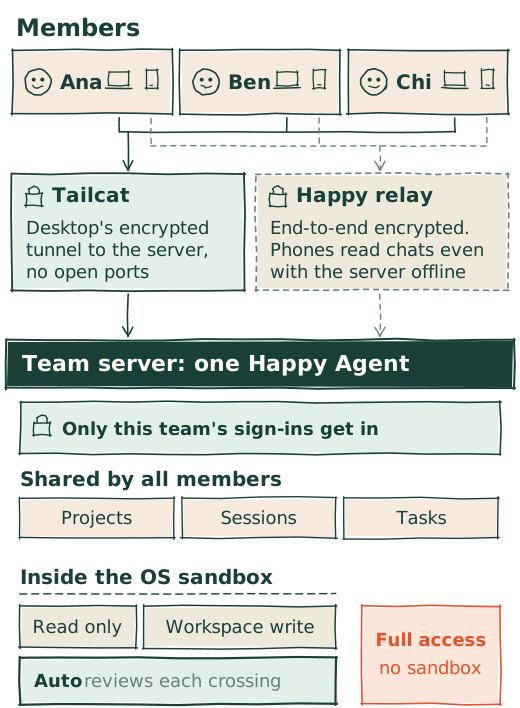
T3 Code has no per-member sign-in: you pair devices to a machine with scoped access, and a guest link shares one thread.
Team setup is multi-step today. We haven't built a remove-member action yet, and members' work runs on the server's Claude, Codex, and Grok accounts. See Multiplayer & Teams.
One harness for every model
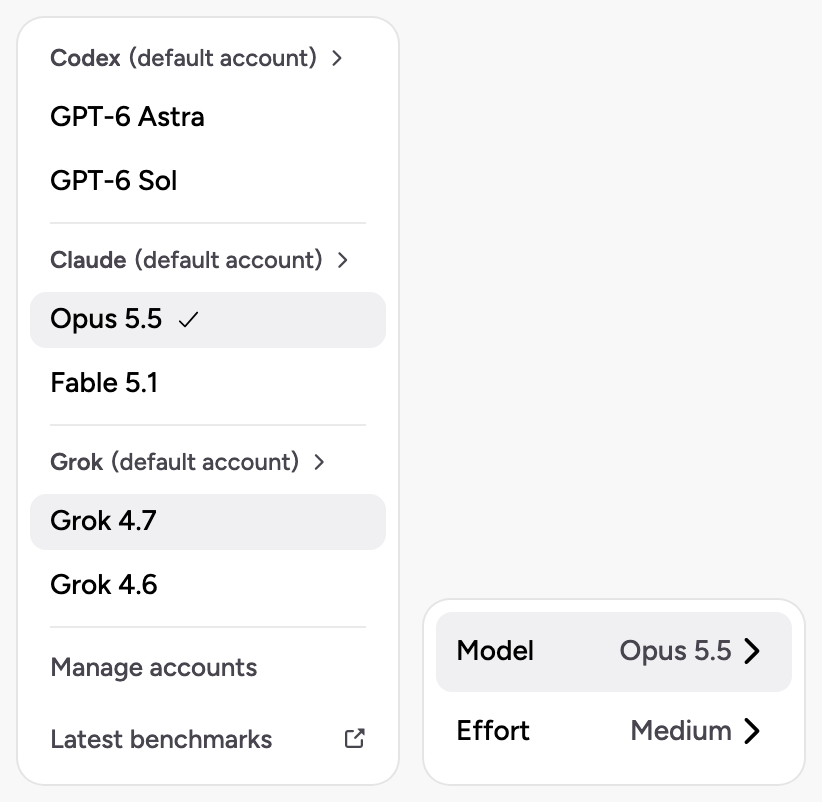
By default Happy Agent runs the agent loop itself. Claude gets Claude Code's prompts and tools, GPT models get Codex's, and Grok gets Grok Build's. The permission model, the OS sandbox, and the session store are shared. Switch models in the middle of a conversation and the new model continues from the same transcript, with each provider's data kept as it was sent.
New sessions start in Auto. Commands run in the OS sandbox, and an action that would cross it is reviewed by a separate agent. See Permissions & Sandbox.
To run a vendor's own agent instead, add Claude Code, Codex CLI, Antigravity, OpenCode, or any ACP agent as a harness in happy.toml. The conversation stays in Happy, and Happy's permission mode is mapped onto the agent's own.
T3 Code always runs each vendor's agent and maps its permission modes onto that provider's controls. Its Auto uses the provider's automatic review, and falls back to asking on providers without one, such as OpenCode and Antigravity. When you switch providers, short conversations transfer whole; longer ones become a budgeted selection, 16,000 tokens by default, without the old provider's reasoning or tool state. The agent can look up the rest with a tool.
Updates in the middle of a turn
Install a Happy Agent update while an agent is working: the running step finishes and is saved, the new version starts, and the same turn continues. The window doesn't reload. See Updates Mid-Turn.
T3 Code resumes supported threads after an update or restart by default. Its docs note that a server update can interrupt running agents and terminal commands first.
Drive it from a script
Happy Agent's REST API sends messages, steers a running turn, stops it, and answers an agent's questions, on your machine or a remote one. See Drive Happy Agent over its REST API. T3 Code offers an MCP server for outside agents and a t3 thread command on the host.
Contributing
Both are MIT licensed. We take pull requests, bug fixes first. T3 Code's README, as of October 27, 2026: "We are (mostly) not accepting contributions yet. Small fixes may be considered. Big features will not be."
Which one
| You want | Use |
|---|---|
| Cursor, Pi, or Muse Code | T3 Code |
| A web client for your machine | T3 Code |
| A team on one agent server, each signed in | Happy |
| One sandbox and permission model for every model | Happy |
To start with Happy, see the Quick Start or download it.